



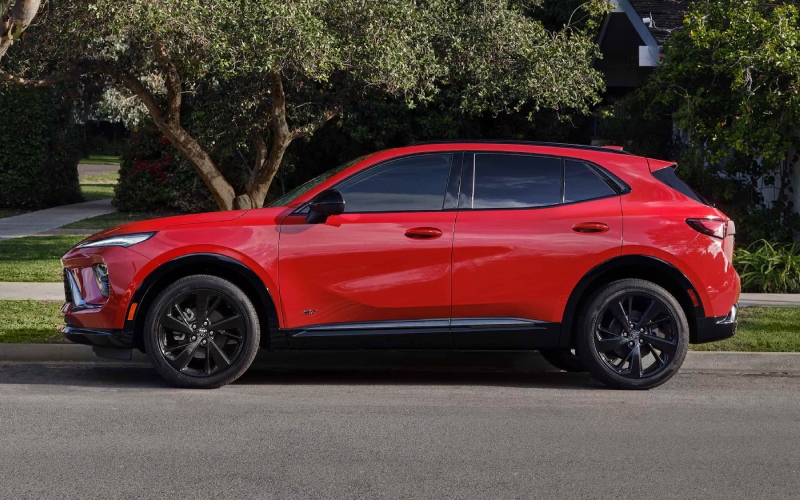
Baker Buick Hudsonville - Does the 2026 Buick Envision offer a bigger screen than the 2026 Lexus NX around Muskegon, MI?
Shoppers often ask a simple but telling question when comparing these two premium compacts: which one delivers the smarter, more expansive infotainment experience for life along the Lakeshore and up US-31? The answer highlights two different philosophies. The 2026 Buick Envision centers the cabin around an ultrawide 30-inch diagonal display—the largest in its class—designed to reduce distraction by placing navigation, media, and key vehicle information in a cohesive, glanceable view. By contrast, the 2026 Lexus NX features Lexus Interface with a standard 9.8-inch touchscreen and an available 14-inch unit that’s crisp and fast, but still split across a smaller canvas than the Envision. Both vehicles support wireless Apple CarPlay and Android Auto; Envision layers in Google built-in compatibility for natural voice navigation with Google Assistant, seamless Google Maps, and access to Google Play.
For West Michigan drivers who value stress-free tech, the difference is less about a spec sheet and more about day-to-day flow. Envision’s sweeping display minimizes menu-hopping and tucks vital drive data alongside maps and audio, so you’re spending less time tapping and more time focusing on the road. It also pairs beautifully with Buick QuietTuning® with Active Noise Cancellation, keeping turn-by-turn prompts clear and calls easy to hear when winds pick up near the lakeshore. NX counters with a refined layout, strong voice controls through Lexus Interface, and the option to step up to 14 inches. If you’re coming out of a traditional split-gauge-plus-center-screen setup, it’s a familiar, high-quality experience—just not as unified as the Envision’s single panoramic interface.
Screen size and usability insights
Beyond raw dimensions, consider how each system handles the information you use most: maps, traffic, audio, incoming calls, and camera views. Envision’s 30-inch layout brings a widescreen map that’s easy to read even at a quick glance, with room to surface media controls and vehicle status without piling on pop-ups. That translates to fewer touches, less eye movement, and a calmer mental load on crowded stretches of US-31 or along Seaway Drive. NX’s 14-inch screen is sharp and responsive and can display large, clear tiles. For drivers who prefer a focused, single-app-at-a-time view, it works well; for those who want more information in parallel, Envision’s canvas gives you more to work with.
Voice, navigation, and everyday tasks
Both SUVs work well with smartphone mirroring, but the Envision goes a step further with native Google built-in. That means quick, conversational commands like “Hey Google, navigate to Pere Marquette Park” or “Find coffee on my route,” complete with real-time traffic reroutes and business info. The benefit is twofold: you can leave your phone in your pocket, and if you switch phones or platforms, your in-vehicle Google account still carries your places and preferences. NX’s Lexus Interface offers natural voice commands and clean routing visuals, especially with the larger screen, and its cloud-based approach is capable and quick. Still, drivers who already live in the Google ecosystem often find Envision’s integration feels a step closer to second nature.
Audio, cameras, and heads-up tech
Audio and visibility tech shape the in-cabin experience just as much as screen size. Envision offers available Bose premium audio and a Head-Up Display on select trims, so turn-by-turn directions and key drive data can surface in your line of sight. NX counters with an available 10-inch Head-Up Display and an optional Mark Levinson sound system on select models—both excellent. During tight downtown parking or navigating a busy lot near Lakeside, each SUV’s camera coverage and parking aids help reduce guesswork. The difference is how each stacks those visuals with your map and media views; Envision’s wider display leaves more space to keep your bearings without trading away other info.
Quick takeaways
- Screen size and layout: Envision’s 30-inch ultrawide display minimizes menu hopping and keeps more information visible without clutter.
- Native integration: Google built-in in Envision adds voice-native navigation and Google account continuity without depending on your phone.
- Everyday clarity: Paired with QuietTuning®, Envision keeps prompts, calls, and guidance clear during highway merges and crosswinds along the coast.
Which is right for your tech priorities?
If you prefer a familiar central touchscreen with robust voice control and a straightforward tile interface, the Lexus NX—especially with the 14-inch display—delivers a polished experience. If your priority is a unified, low-effort command center that places navigation, media, and vehicle info across a single expansive canvas, the Envision’s 30-inch display is a standout. The best way to know is to put your hands on each system with your daily apps and routes in mind. Bring your favorite playlists, saved map locations, and a couple of realistic stops to simulate a weekday.
Frequently Asked Questions:
Does the 2026 Buick Envision’s 30-inch display replace the instrument cluster?
It’s a sweeping, driver-oriented interface that can present key driving info alongside navigation and media. The layout helps reduce the need to toggle between screens, keeping more of what you need visible at a glance.
Can I use Apple CarPlay or Android Auto if I prefer them over Google built-in?
Yes. The Envision supports wireless Apple CarPlay and Android Auto. You can choose native Google Maps or mirror your preferred apps—whichever suits your routine.
How does the Lexus NX 14-inch screen compare for daily driving?
It’s crisp and responsive, with large, readable tiles and strong voice control via Lexus Interface. If you like a focused, single-app view and the aesthetics of a big central touchscreen, it’s an excellent option.
Is voice control reliable in both SUVs during highway noise or crosswinds?
Both systems are capable, but the Envision’s QuietTuning® with Active Noise Cancellation can make a noticeable difference in voice command clarity and call quality on breezy drives along US-31.
At Baker Buick GMC Hudsonville—serving Rockford, Holland, and Muskegon—we encourage drivers to test both systems back-to-back with the same route and tasks. That side-by-side comparison quickly reveals which interface feels more natural and less distracting. One final tip: try entering a multi-stop route, adjust audio, and place a quick call mid-journey. If you’re looking for the fewest taps and clearest visuals, the Envision’s ultrawide display tends to win the day.